How It Works
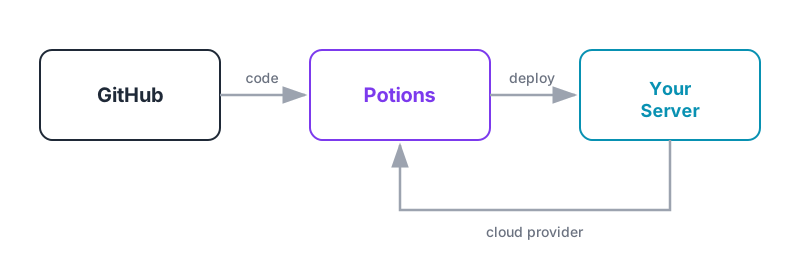
Potions connects to your cloud provider - DigitalOcean or Hetzner Cloud - and your GitHub repositories, then handles everything between pushing code and running in production.
Here's the high-level picture.
The Moving Parts
- Your cloud provider (DigitalOcean or Hetzner Cloud): provides the VPS your apps run on, Potions creates and manages it on your behalf. The servers belong to you.
- GitHub: hosts your source code. You install the Potions GitHub App and choose which repositories it can access.
- Potions: the control plane. Provisions servers, builds Mix releases, manages deployments, and keeps everything configured.
The Lifecycle
1. Connect your accounts
From the dashboard, connect a cloud provider (DigitalOcean or Hetzner Cloud) and GitHub. This is a one-time setup, Potions handles token management after that.
2. Create a server
Pick a provider, region, and size, and Potions provisions a server fully configured for Phoenix apps - PostgreSQL, automatic SSL, firewall, security hardening, and the BEAM runtime. The whole process takes about 5 minutes, and you get real time updates.
See Creating a Server for details.
3. Create an app
Select a GitHub repository and branch. Potions creates a dedicated PostgreSQL database (or connects to one you bring), generates environment variables, and sets up everything your app needs to run. Your server can host multiple apps.
See Creating an App for details.
4. Deploy
Either deploy manually or push to your branch with auto-deploy enabled. Potions takes care of the rest.
What Happens During a Deploy
Deployments have three stages: build, verify, and switch.
Build: Potions clones your repository, fetches dependencies, compiles your code, builds a Mix release, and uploads it to your server. Build logs stream to the dashboard in real time.
Verify: The new release starts on a standby slot while your current version keeps serving traffic. Potions runs health checks against the new instance to confirm it's responding before anything changes.
Switch: Once the new instance is healthy, Potions updates the reverse proxy to route traffic to it. The switch is near-instant from your users' perspective. Existing connections finish naturally while new traffic routes to the updated instance.
If the health check fails, the new instance is stopped and your current version keeps running untouched. A failed deploy never affects your live app.
See Zero-Downtime Deployments for the full breakdown.
Server Stack
Every server Potions provisions runs Ubuntu 24.04 with:
| Component | Purpose |
|---|---|
| Erlang/OTP | BEAM virtual machine |
| Elixir | Runtime for your Phoenix app |
| PostgreSQL | Database server (one database per app, or bring your own) |
| Caddy | Reverse proxy with automatic SSL via Let's Encrypt |
| systemd | Process supervision for your app services |
| UFW | Firewall (only ports 22, 80, 443, and UDP 443 for HTTP/3) |
| fail2ban | Brute-force SSH protection |
Runtime versions (Erlang, Elixir, Node.js) are configured per app and managed automatically on the server.
Things to Know
- Your servers are yours. Potions configures and manages them, but you keep full SSH access and can use them with or without Potions.
- Failed deploys are safe. Traffic is protected from a failed deploy. If something goes wrong, your running app isn't affected.
- One deploy at a time per server. If you trigger a deploy while another is in progress, the new one waits in a queue.
- Most builds complete in a few minutes. The build pipeline has a 15-minute timeout for larger projects.
Next Steps
Ready to get started? The Quick Start Guide walks through the full setup in under 10 minutes.