Creating a Server
A server in Potions is a VPS provisioned with everything your Elixir/Phoenix apps need to run: PostgreSQL, Caddy for automatic SSL, and a locked-down firewall. Each server can host multiple apps.
Potions supports DigitalOcean and Hetzner Cloud as server providers. Connect either (or both) and choose which one to use when you create a server.
Before You Start
You'll need:
- A connected cloud provider account - DigitalOcean (see Connecting DigitalOcean) or Hetzner Cloud (see Connecting Hetzner)
- An active Potions subscription
Adding a Server
If this is your first server, the setup wizard will walk you through server creation. For additional servers, click Add server in the server bar at the top of the dashboard.
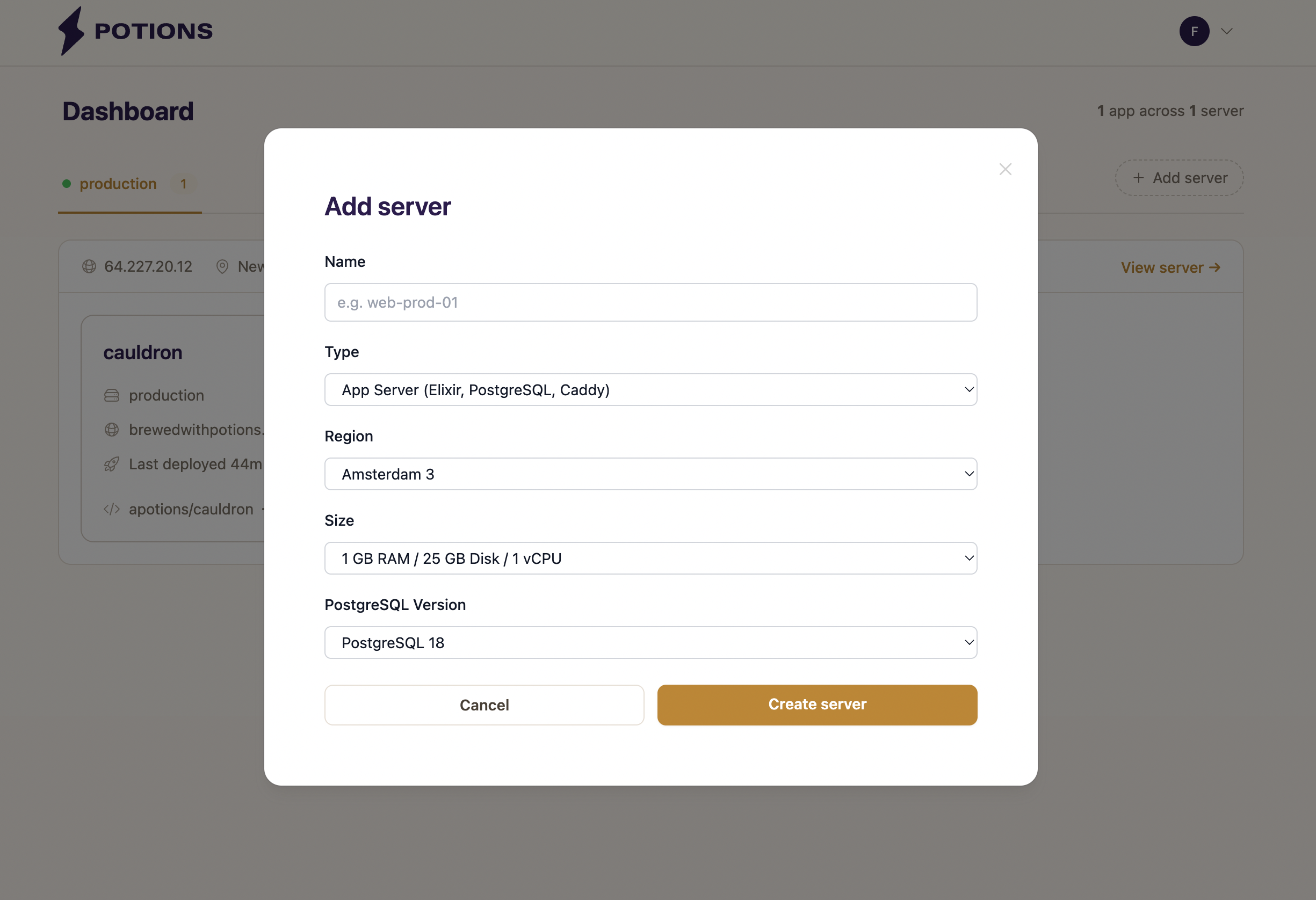
Fill in the following:
Name
A label for your reference - something like web-prod-01 or staging. Names can contain letters, numbers, and hyphens, can't start or end with a hyphen, and are at most 63 characters. They must be unique across your servers. The name is also sent to your provider as the droplet or server name and set as the server's hostname. You can rename a server later from its Settings tab.
Provider
The cloud provider to create this server on. If you've connected both DigitalOcean and Hetzner Cloud, pick the one you want for this server - the available regions and sizes update to match. If you've only connected one provider, it's selected automatically.
Type
Choose what the server is for:
- App Server (Elixir, PostgreSQL, Caddy) configures the full stack for running Phoenix apps and is the default.
- Database Server (PostgreSQL only) runs PostgreSQL on its own box for one or more app servers to share over the private network. See Dedicated Database Servers for when and how to use one.
The rest of this page covers app servers in more depth.
Region
Where your server will be created. Available regions depend on your cloud provider. You should pick the region closest to your users. See Server Regions & Sizes for the full list.
Size
Choose a server size based on your workload. Available sizes depend on your cloud provider. See Server Regions & Sizes for a full comparison.
The 1 GB RAM tier works for small apps and development. For production workloads, 2 GB or more gives PostgreSQL and your app room to breathe.
Potions automatically configures swap space based on the size you choose: 512 MB for the 1 GB tier, 1024 MB for all larger sizes.
Database
Choose which PostgreSQL an app server installs, or none. The default is PostgreSQL 18; versions 17 and 16 are also offered. Every app server can also host SQLite apps, whichever you choose: Litestream and the sqlite3 tool are installed on all of them, so one PostgreSQL server can run some apps on PostgreSQL and others on SQLite.
No PostgreSQL (for SQLite apps) skips PostgreSQL to save the memory it would use. Apps on that server use their own SQLite file, or PostgreSQL on a dedicated database server or an external provider. You can't add PostgreSQL to the server later. See SQLite and Litestream for when SQLite fits and what it can't do (a SQLite app runs on one server only, so no clusters).
Database servers always run PostgreSQL.
What Happens After You Click Create
Once you submit the form, you can watch Potions provision your server in real time.
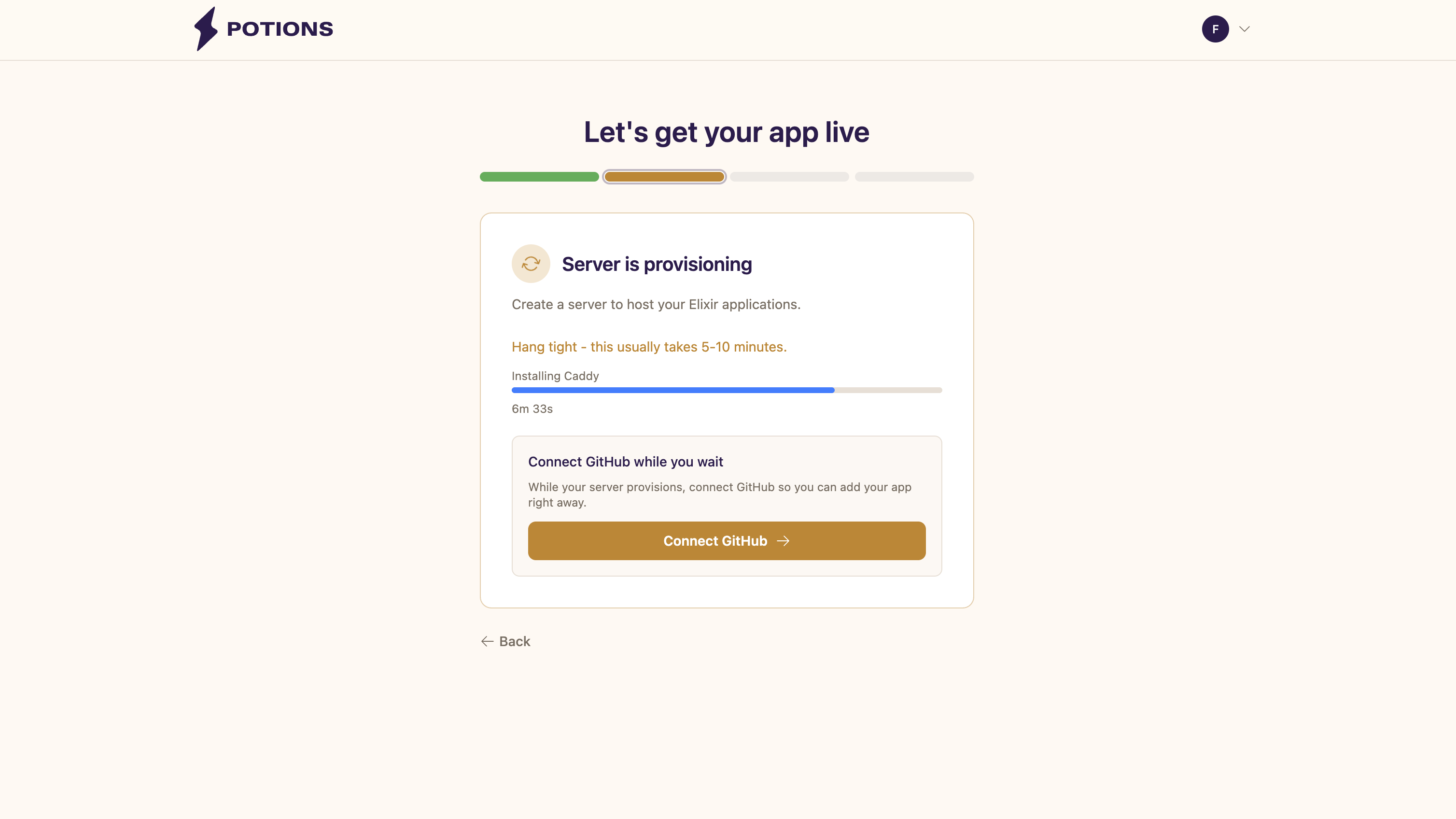
Here's what Potions does behind the scenes:
1. Create the Server
Potions creates a server running Ubuntu 24.04 in your chosen region and size. The server typically becomes available within 30 seconds.
2. Provision the Server
Potions connects via SSH and configures the server with everything your Elixir/Phoenix apps need: system updates, a dedicated deploy user, PostgreSQL, Caddy, a firewall, SSH hardening, and a metrics agent. You'll see each step name update in the status badge as provisioning progresses.
The entire process usually takes about 5 minutes.
3. Server Is Active
When all steps complete, the server status changes to Active and you're ready to create your first app.
If Provisioning Fails
If for any reason provisioning fails, you can click Retry Provisioning to resume from where it left off. Potions tracks which steps completed, so a retry doesn't start from scratch.
Things to Know
-
Servers are created on your cloud provider account. The server belongs to you and appears in your provider's dashboard. You have full SSH access using the
deployuser. - Each server can host multiple apps. You don't need a separate server for each app. Potions handles port assignment, systemd services, and Caddy routing for each app on the server. How many apps a server can comfortably run depends on the size you chose.
- Cloud provider charges apply. Potions creates a real server on your account. Your cloud provider bills you directly for the infrastructure at their standard rates.