Rolling Back a Deployment
Things happen - when a deploy introduces a bug or something breaks, you can roll back to the previous release in seconds. Rollbacks reuse the release binary that's already on your server. There's no rebuild, no waiting for a fresh build pipeline run.
How Rollbacks Work
Potions uses blue-green deployment slots to run your app. Each deploy targets the idle slot while the active slot serves traffic. After a successful deploy, the old slot's release binary stays on disk.
When you roll back, Potions:
- Starts the previous slot's existing release binary
- Runs health checks against it
- Switches Caddy to route traffic to the previous slot
- Drains and stops the current slot
Because there's no build step, a rollback completes in seconds.
Rolling Back from the Dashboard
- Go to your app's Deployments tab
- Click the Rollback button next to the Deploy button
- Confirm the rollback
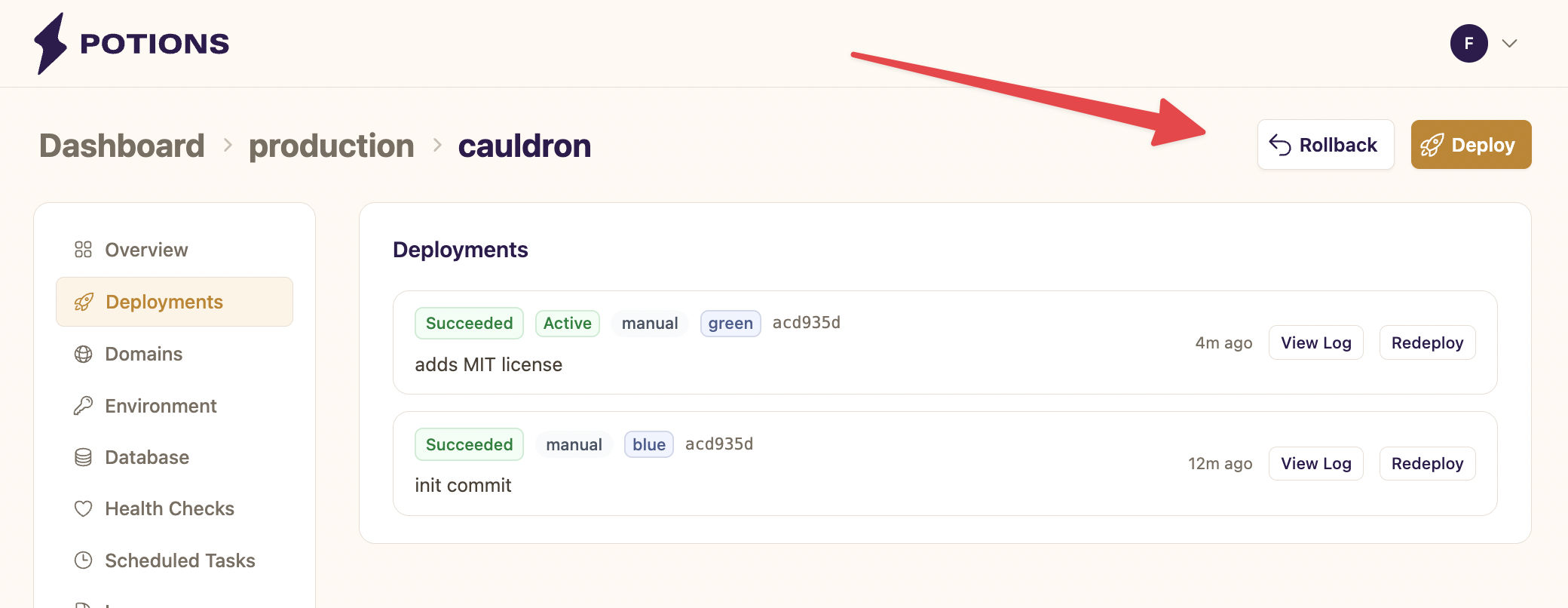
Potions creates a new deployment entry with a rollback badge so you can distinguish it from regular deploys in your deployment history. The previous active deployment is marked as Rolled Back.
When You Can Roll Back
The Rollback button appears once your app has been deployed at least twice (so both slots have a release) and there's no deployment in progress.
Database Migrations and Rollbacks
Rollbacks revert your application code but do not revert database migrations.
In most cases, this is fine. Additive migrations, like new columns, new tables, and new indexes are backwards-compatible with the previous release. The old code ignores columns it doesn't know about.
However, if you have a destructive migration, for example, if a migration dropped a column or renamed a table that the previous release depends on, rolling back the code without reverting the schema will cause errors.
If you need to revert a migration, the easiest way is to connect to your app via the in-browser IEx console and run:
Ecto.Migrator.run(MyApp.Repo, :down, to: 20240101000000)
Note: replace MyApp.Repo with your app's repo module and the version number with the migration you want to roll back to.
Rollback vs. Redeploy
Potions offers two ways to go back to a previous state:
| Rollback | Redeploy | |
|---|---|---|
| What it does | Starts the previous slot's existing binary | Builds a fresh release from the same commit |
| Speed | Seconds | Minutes (full build pipeline) |
| When to use | Revert a bad deploy quickly | Rebuild after env var changes or transient build failures |
Use Rollback when you need to revert fast and the previous release worked. Use Redeploy when you need a fresh build of a specific commit, for example, after changing an environment variable or fixing a transient build failure.
Things to Know
- Rollbacks are one level deep. You can roll back to the previous slot, but if you need to go further back, redeploy from the specific commit instead. Keep in mind that redeploying an older commit won't revert database migrations that were added after it. See Database Migrations and Rollbacks above.
- Auto-deploy stays enabled. Rolling back doesn't change your auto-deploy setting. If auto-deploy is on and you push a new commit, Potions will deploy the new commit on top of the rolled-back release.