Troubleshooting Failed Deploys
When a deployment fails, Potions marks it as Failed and preserves the build log so you can diagnose what went wrong. Your running app isn't impacted by a failed deploy.
Reading the Build Log
Every failed deployment has a build log. Open the Deployments tab on your app, find the failed deployment, and click View Log to expand the full output.
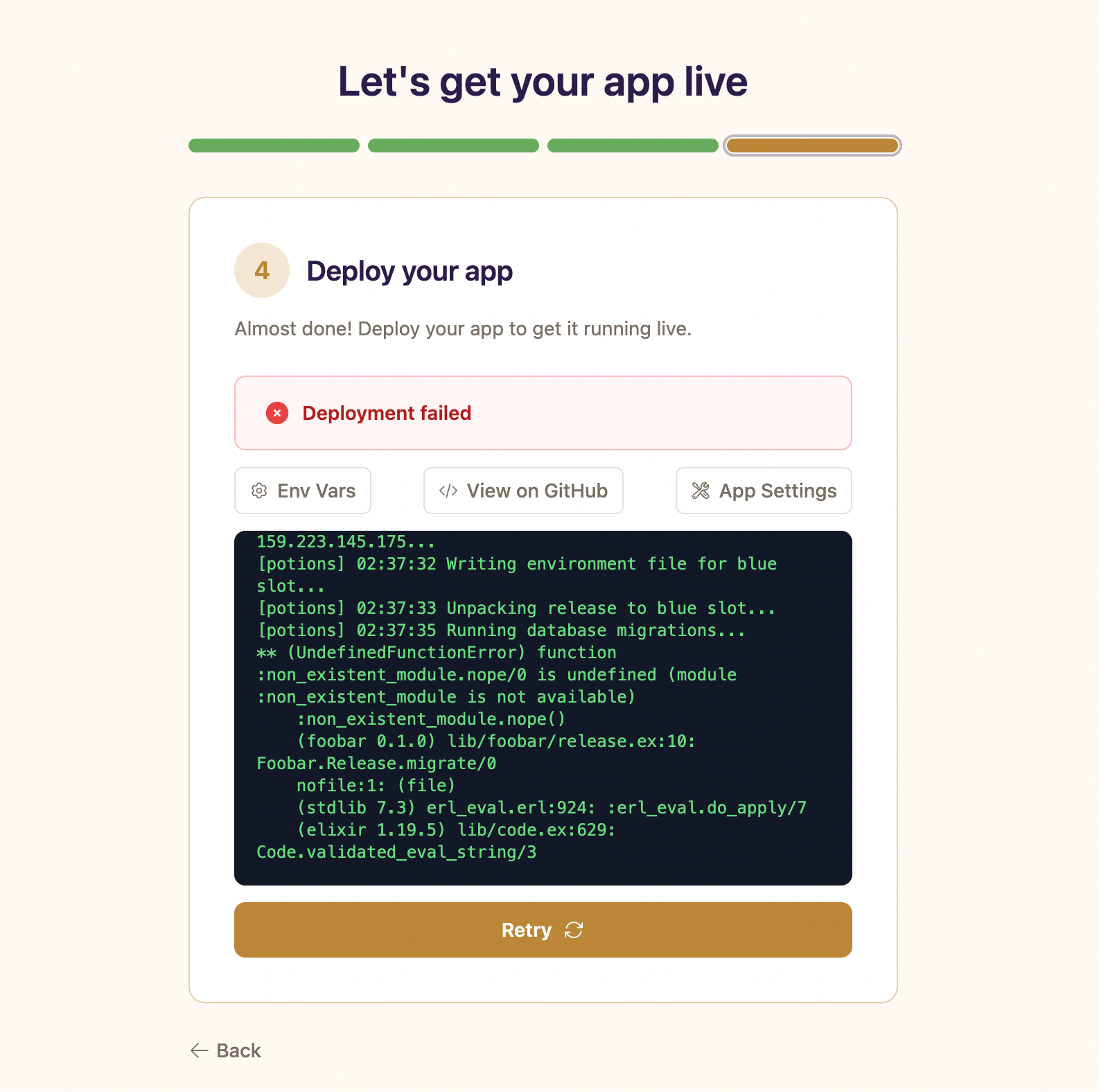
The log shows every step of the build and deploy process, from cloning your repository through starting the new instance. The last few lines before the failure message usually point directly to the cause of the failure.
Common Failures
Compilation errors
The most frequent cause of failed deploys. Your code has a syntax error, a missing module reference, or an unresolved function call. The build log will show the full mix compile output with file names and line numbers.
What to look for in the log:
** (CompileError) lib/my_app_web/live/page_live.ex:12: undefined function foo/1How to fix it: Fix the compilation error locally, push the fix, and deploy again.
Dependency resolution failures
mix deps.get can fail when a dependency version doesn't exist, a private package requires authentication, or a Git dependency URL is unreachable.
What to look for in the log:
Failed to use "made_up_dep" because there are no packages or versions that match...
How to fix it: Check your mix.exs dependency versions and your mix.lock file. Make sure mix.lock is committed - Potions runs mix deps.get with the lock file.
Database migration errors
Migrations run on your production database after the release is built and uploaded. A failing migration stops the deploy before the new instance starts.
What to look for in the log:
** (Postgrex.Error) ERROR 42701 (duplicate_column) column "email" of relation "users" already existsCommon causes include:
- A SQL error in the migration (duplicate column, constraint violation, conflicting table name)
-
The
DATABASE_URLenvironment variable is wrong or the database is unreachable
How to fix it: Fix the migration locally, push, and redeploy.
External databases
If the app uses an external database, the migration step is the first thing in a deploy that talks to it, so a connection problem shows up here:
-
no encryption,SSL requiredorconnection is insecure: the provider requires TLS and the app connected in plaintext. Add onessl:line toconfig/runtime.exs; see Encrypting the connection. -
{:tls_alert, {:unknown_ca, ...}}: the app verifies certificates, but the provider's CA isn't publicly trusted (Supabase, DigitalOcean Standard edition, RDS). Usessl: [verify: :verify_none]or commit the provider's CA forcacertfile; see Encrypting the connection. -
non-existing domain - :nxdomainor:enetunreachfor a host that resolves fine from your machine: the host only has an IPv6 address. Use the provider's IPv4 endpoint (for Supabase, the session pooler), or run the check on the app's Database tab so Potions setsECTO_IPV6when the server can reach it. See the connection check. -
timeoutorconnection refused: the provider's allowlist doesn't include the app server's public IP. Add it and redeploy. -
password authentication failed: the password was rotated at the provider. Paste the new URL on the app's Database tab and redeploy.
Test connection from this server on the Database tab shows the current state without a deploy.
Health check failures
After the new instance starts, Potions requests the app's health check path on it (/ by default, configurable under Settings > Health check). If the instance doesn't answer with a 2xx or 3xx after the configured number of retries, the deploy fails. The log prints the HTTP status for every attempt.
What to look for in the log:
Health check attempt 3/6 failed (HTTP 404), retrying in 5s...
Health check attempt 6/6 failed (HTTP 404).
Health check failed after 6 attempts. Rolling back...
When a health check fails, Potions also prints the last 30 lines of the application's system journal, which often reveals the underlying crash:
--- Application logs (last 30 lines) ---Common causes include:
-
The app crashes on startup: a missing environment variable, a bad database connection, or an unhandled error in your
Application.start/2 -
The health check path returns an error response: Potions accepts any 2xx or 3xx status code. Responses with status 400 or higher (including
404) count as a failure
What the status in the log usually means:
-
HTTP 404: the route doesn't exist, or it isn't compiled into the release. Check that the path under Settings > Health check matches your router exactly, including case. -
HTTP 301or302: this passes, but a redirect answered instead of your app. Usually a login redirect on/, orforce_sslwith a custom:excludethat no longer listslocalhostand127.0.0.1. Point the path at a dedicated route, or restore those hosts in:exclude. -
HTTP 000: no HTTP response at all. The app isn't listening on itsPORT, most often because it crashed on boot. Read the journal lines printed right after the failed check. -
HTTP 503on early attempts: your health endpoint checks the database and the connection pool was still connecting. The retries cover this; only a503on every attempt is a real failure.
How to fix it: Check the application logs in the deploy output. If the app is crashing, fix the underlying error and redeploy. See Health Checks for choosing a path and adding a /health endpoint.
Asset build failures
If your app has build_assets enabled (the default), Potions runs mix assets.deploy during the build. JavaScript or CSS compilation errors will fail the deploy.
What to look for in the log:
Building assets...
** (Mix) Could not compile "esbuild"...
How to fix it: Run mix assets.deploy locally to reproduce the error. Fix the asset pipeline issue, push, and redeploy.
Build timeout
Builds that don't complete within 15 minutes are terminated and marked as failed.
What to look for in the log:
Build timed out after 900 secondsCommon causes include:
- A dependency that hangs during compilation (native extensions, NIF builds)
- An unusually large project being compiled from scratch
How to fix it: Check if a specific dependency is causing the slow build. If your project legitimately needs more than 15 minutes for a cold build, contact support. Subsequent builds are faster because dependencies and build artifacts are cached between deploys.
GitHub access errors
Before the build starts, Potions needs to fetch your code from GitHub. Here are some errors that can occur at this stage:
| Error message | Cause | Fix |
|---|---|---|
| "GitHub App is no longer installed" | The Potions GitHub App was uninstalled from your GitHub account | Reconnect GitHub from your account |
| "Your GitHub connection has expired" | The OAuth token is no longer valid | Re-authenticate GitHub in your account |
| "GitHub access was denied" | The Potions GitHub App doesn't have access to this repository | Check the app installation settings in GitHub and grant access to the repository |
| "Could not find branch..." | The configured branch doesn't exist in the repository | Check the branch name in your app settings |
Release build failures
mix release can fail if your release configuration is invalid or missing required settings.
What to look for in the log:
Unknown release "my_app"
Potions auto-detects your release name from mix.exs. If detection fails and no explicit release is configured, the build will fail.
How to fix it: Make sure your mix.exs has a valid :app key, or configure an explicit release in your mix.exs.
Failures That Don't Affect Your Running App
Potions is designed so that a failed deploy doesn't impact your running application:
- If the build fails: nothing is uploaded to your server. The current instance is untouched.
- If migrations fail: the new instance never starts. The old instance continues running against the database as-is.
- If the health check fails: Potions stops the new instance and restarts the active one as a safety measure. Traffic never switches to an unhealthy instance.
Retrying a Failed Deploy
After fixing the underlying issue, you have two options:
- Deploy: click the Deploy button to deploy the latest commit on your branch. Use this when you've pushed a fix.
- Redeploy: click Redeploy on a previous deployment to rebuild the same commit. Use this when the failure was transient (network timeout, GitHub rate limit) and the code itself is fine.
Things to Know
- Builds don't auto-retry. If a deploy fails, Potions doesn't try again automatically. You need to fix the issue and trigger a new deploy manually.
- First deploy needs the database. Potions provisions a PostgreSQL database when you create an app. The Deploy button stays disabled until provisioning completes (typically a few seconds). If you see a failed deploy with "Database has not been provisioned yet," wait a moment and try again. Apps on an external database skip provisioning; their first deploy talks to your provider directly.